R·01
Contractor
Submit once. Know where it stands.
Send transmittals, see each document's response as it lands, and resubmit against the original with the history attached.
Send submissions to consultants and clients, follow up on every response, and review your subcontractors' work in one project record. Mowafeq AI finds any document and its response in seconds.

Mowafeq AI
Project assistant
Try asking
Trusted by leading AEC organizations






The Problem
Submissions go out by email and responses come back the same way. Nobody can say which revision was approved or what is still with the consultant.
No single source of truth.
One auditable hub.
The Solution
Transmittals, responses, revisions and letters with your consultants, clients and subcontractors, kept together document by document.
01
One searchable registry for all project documents. Custom fields, full version history.
Document intake
MEP-Spec-Rev3.pdf
TX-201
Structural-Calcs-A4.pdf
TX-202
Site-Inspection-21.pdf
TX-203
03
Send to the reviewing company, copy who needs visibility, and see each document's response as it lands.
Approved
00
Pending
00
Revise
00
04
Collect internal comments before the official response, and review subcontractor submissions the same way.
Approval workflow
Submitted
Site Engineer
Consultant review
Design Consultant
Client approval
PMO — Client
Issued for construction
Document Control
In the field
Contractors, consultants and clients on Qatar projects work from the same record, at the desk or on site.
Live on Qatar projectsOpen a drawing, check its revision and status, and see the response from your phone.
Every submission, review and response is logged with who did it and when.
Every screen in both languages, right-to-left where it should be.
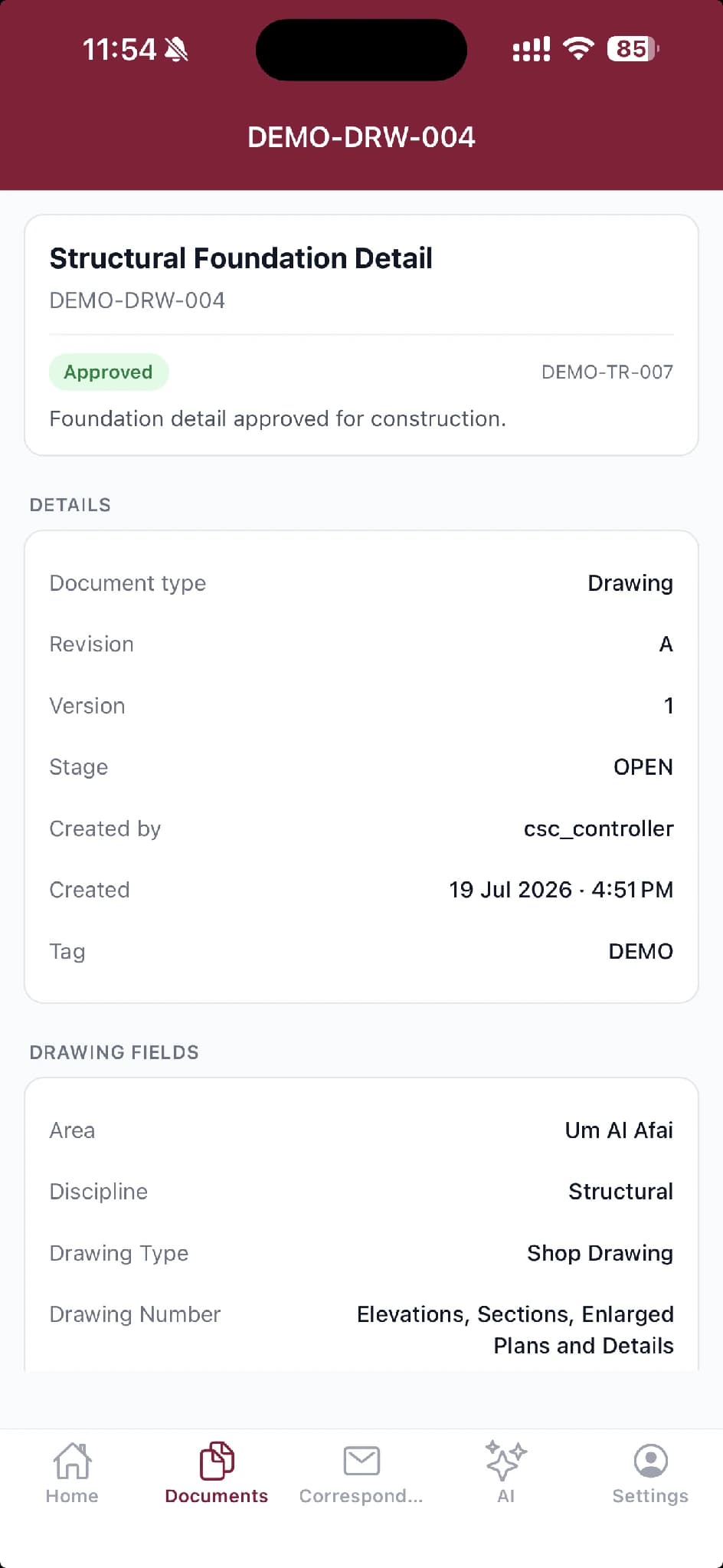
Review from site. Keep the record.
Features
Everything a document controller, project manager, or contracts lead needs — without bouncing between tools.
Package and distribute documents. Track responses: Approved, Revise, or Rejected.
Create, send, and track official letters. Full lifecycle from draft to closure.
Flexible document types with custom fields. Track every revision with full history.
Build approval templates with sequential steps. Automatic email notifications.
See pending items at a glance. Quick actions and real-time status updates.
Annotate, comment, and digitally sign PDFs without leaving the browser.
Export any log, register, or audit trail in a single click — no scripting, no IT ticket.
Granular permissions for contractors, consultants, and client / PMC teams.
Ask questions in plain language, get cited answers drawn from your project documents — with page-level references.
Built for every company on the project
Each company works in the same record and sees what it needs. Nobody keeps a private copy of the truth.
Submit once. Know where it stands.
Send transmittals, see each document's response as it lands, and resubmit against the original with the history attached.
Review, respond, stay on record.
Route submissions through your internal review, mark up and stamp PDFs in the browser, and respond document by document.
See the project without asking.
What's pending, what's overdue and who has it, live, without waiting for a status report.
Run more projects with the same team.
Automatic reference numbers, bulk import and registers that update themselves. Less admin, more control.
Benefits
Powerful search and filters. Every document seconds away.
Complete revision history. Access any previous version.
Document-level status on all transmittals.
Consistent workflows. Clear accountability.
Complete audit trails. Timestamped records.
From single projects to complex portfolios.
Why Choose Us
Built for the region. Priced for reality. Ready when you are.
| Mowafeq | Enterprise Platforms | Email + Excel | |
|---|---|---|---|
| 01 Deployment | Days to deploy, not months | Months | — |
| 02 GCC Focus | Dedicated Qatar-based team with local time zone support | Global, generic | No system at all |
| 03 AI Capabilities | Built-in AI assistant with natural language Q&A and cited answers | Add-on or not available | None |
| 04 Pricing | Transparent, region-appropriate pricing | Enterprise lock-in | Free, but no control |
| 05 Customization | Custom document types, flexible workflows — no code required | Rigid | Non-existent |
| 06 Support | Qatar-based, same time zone | Global queues | None |
| 07 Audit Trail | Complete, timestamped | Platform-dependent | Scattered in inboxes |
| 08 User Adoption | Minimal training | Weeks of onboarding | Already broken |
All the power of enterprise solutions. Built for teams like yours.
No bloat. No complexity. Just document control that works.
Social Proof
See how teams are using Mowafeq to bring order to their project documentation.
10,000+
Transmittals Sent
Document submissions tracked and managed
10TB+
Documents Managed
Project documentation securely stored
17
Custom Workflows Built
Tailored to each client's review process.
An AI assistant that reads every document in the project — so your team doesn't have to.
Mowafeq AI
Project assistant
Natural language Q&A across all project documents
Every answer cites the exact document, section, and page
Search all docs or focus on a single file
Self-hosted — project data never leaves your deployment
Book a personalized demo or reach out to our team directly.
Pricing
Mowafeq pricing scales with your needs. Start with what you need, upgrade as you grow.
For small teams getting organized
For growing teams with complex workflows
For organizations requiring maximum control
All plans include secure cloud hosting, automatic backups, and our 99.9% uptime guarantee.
FAQ
Yes. Both can join the project. Choose the receiving company for each submission and copy others who need visibility. Use letters to keep formal correspondence on record.
Yes. Create custom document types with configurable fields—no code changes required.
Mowafeq tracks major revisions and minor versions. Access any previous version instantly.
Yes. Subcontractors can join as project companies with role-based access. Exchange submissions and responses with them through transmittals.
Yes. Bulk import via Excel with validation and error reporting.
Yes. Encrypted connections, secure S3 storage, role-based access, and complete audit logging.
The client-side consultant specifies Mowafeq in the tender BOQ and you price it in. The platform is live from day one, and every party works in the same record.
Book a demo to get started. We'll help you set up your first project.
Get Started
Book a demo and see your submissions, responses and subcontractor reviews in one record.
See Mowafeq in action with a personalized walkthrough.
Have questions? Reach out to our team directly.
Contact Us
Have questions? Reach out to our team directly.