R·01
Contractor
Submit once. Know where it stands.
Send transmittals, see each document's response as it lands, and resubmit against the original with the history attached.
One place where the client, the consultant and the contractor submit, review and approve every project document. A workspace for your company's own files. An AI that answers from all of it.



Trusted by leading AEC organizations







The problem
Submittals wait in inboxes. Logs are typed by hand. Nobody can say which revision was approved, or who has it now.
Without Mowafeq
With Mowafeq
The platform
Start with one. They share the same projects, people and permissions.
Submit, review, approve.
Transmittals, letters, registers and review workflows between every company on the project.
Your company's files, in order.
A drive for your own company: office folders, a folder for every project, and a clear answer to who can see what. It works without a project plan.
Ask the project.
Ask in plain language. Get an answer with the document and the page it came from.
Respond from site.
Your inbox, responses and notifications on your phone. Check a drawing's revision before anyone builds from it.
Document Control
The contractor submits. The consultant reviews. The client sees it all. Every response stays attached to the document and the revision it answers.
One searchable registry for all project documents. Custom fields, full version history.
Distribute documents to stakeholders. Track responses at the document level.
Reusable templates with sequential steps. Automatic notifications at each stage.
Send and track official letters. Know exactly when they're received and actioned.
Documents
Register · 1,284 documents · 9 disciplines
WorkspaceNew
Workspace is where your company keeps its own documents: office folders, tender files and a folder for every project. It runs on its own, and it is the simplest way to start with Mowafeq.
Projects
New projectOne login. Switch between Workspace and your projects from the top bar.
Mowafeq AI
Mowafeq AI reads every document in the project, so your team doesn't have to. Every answer names its source.
Mowafeq AI
Project assistant
Try asking
Mobile
Contractors, consultants and clients on Qatar projects work from the same record, at the desk or on site.
Live on Qatar projectsOpen a drawing, check its revision and status, and see the response from your phone.
Every submission, review and response is logged with who did it and when.
Every screen in both languages, right-to-left where it should be.
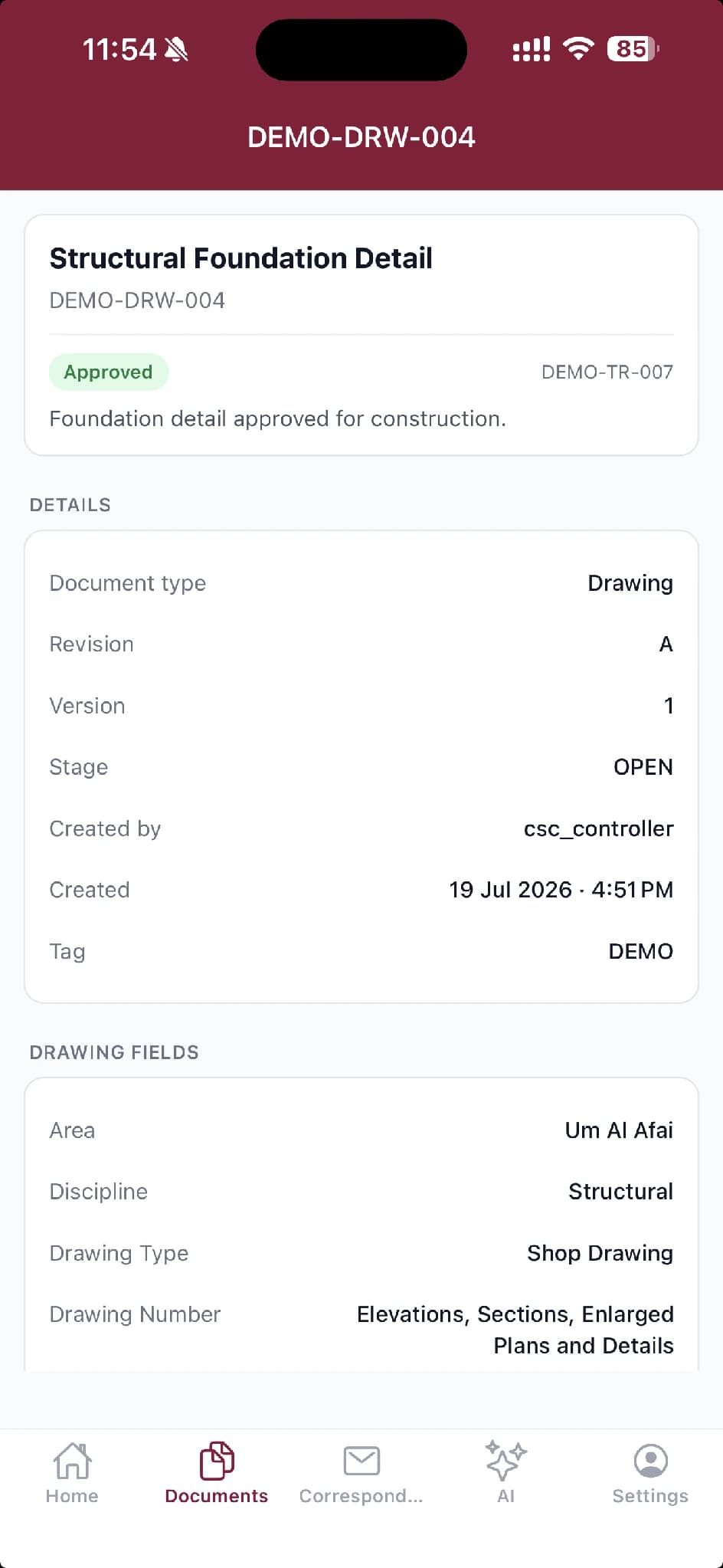
Review from site. Keep the record.
Built for every company on the project
Each company works in the same record and sees what it needs. Nobody keeps a private copy of the truth.
Submit once. Know where it stands.
Send transmittals, see each document's response as it lands, and resubmit against the original with the history attached.
Review, respond, stay on record.
Route submissions through your internal review, mark up and stamp PDFs in the browser, and respond document by document.
See the project without asking.
What's pending, what's overdue and who has it, live, without waiting for a status report.
Run more projects with the same team.
Automatic reference numbers, bulk import and registers that update themselves. Less admin, more control.
In production
Contractors, consultants and clients use Mowafeq on live projects in Qatar.
$275M
of projects managed
Across 6+ companies working on the same records.
20 days6 days
3.3× faster
Same Doha consultant, two projects: on Mowafeq, shop drawings came back in 6 days instead of 20.
Read the case studyI like it. It's much easier now. I can see how many reviews are waiting on me.
Lead reviewer, supervision consultant
On the review workflow overview
Plans
Workspace is for your own company's documents. A Project plan puts every company on the job onto one record. Take either, or both.
For your company
Your company's own drive and documents.
Getting started
For a project
One project, every company on it.
Getting started
For a project
For larger project teams.
Getting started
Add when you need it
All plans include secure cloud hosting, automatic backups, and a 99.9% uptime target. Workspace and Project plans are separate subscriptions.
Estimate your savingsFAQ
Construction companies, engineering consultancies, and government contractors managing complex project documentation.
Workspace is your company's own drive: office folders, a folder for every project, and access set by role. It works on its own, without a Project plan, and it is the simplest way to start.
Ask a question in plain language and get an answer from your project's documents, with the document and page it came from. It only answers from the project you are in.
Yes. Multi-company projects with role-based access control are fully supported.
Yes. Bulk import via Excel with validation and error reporting.
Yes. Encrypted connections, secure S3 storage, role-based access, and complete audit logging.
Client-side consultants specify Mowafeq in their tender BOQ. The contractor prices it in. The platform deploys on day one — at no cost to your firm. We supply the BOQ wording and vendor information sheet.
Book a demo. Start with Workspace for your own company, or a Project plan for a job shared with other companies. We'll help you set up your first project.
Get started
Book a demo and bring a sample register and your review sequence. We'll plan your document types, import and rollout with you.
See Mowafeq in action with a personalized walkthrough.
Have questions? Reach out to our team directly.